
More concepts#
Overview#
While not necessary to understand the basic usage, those advanced concepts are fundamental to understand Mamba in details.
Packages repository#
repo, is a generic way to describe a storage location for software packages.In the Mamba’s context, it may points to a packages server, a channel or a subdir.
Channel#
channel is an independent and isolated repo structure that is used to classify and administrate more easily a packages server.Note
A packages server may host one or multiple channels.
Subdir#
subdir is a channel subdirectory specific to a given operating system/platform pair.Mamba is a general purpose, language agnostic package manager. The subdir structure is a convenient way to provide and access packages depending on the targeted os and platform.
Typically linux-64, osx-arm64 or win-64 but not limited to those ones.
A subdir provides the packages tarballs alongside a packages index including additional metadata.
Note
In most cases, both noarch and <os>-<platform> subdirs are used for an operation requiring data from the repo
Packages index#
Note
Those metadata include license, file size, checksums, etc.
In Mamba, it is more often called a repodata in reference to the index filename repodata.json.
A repodata is specific to a channel subdirectory.
Package tarball#
zip file or so.In the case of Mamba, 2 conda formats are used as package tarball:
tar.bz2is the historical formats: atarfile/ball that has been compressed usingbzip2algorithmcondamore recent format that allows faster access to packages metadata
Linking#
Each package contains its files index, used at a step called linking.
The linking consists in creating a link between the package cache where the tarballs are expanded into multiple directories/files and the installation target prefix.
The 3 kinds of links are:
hard-links and fallback to copy.The advanced user may want to change that behavior using configuration (see the relevant CLI or API reference for more details):
allow
soft-linksto be used as a preferred fallback tocopy(try tocopyifsoft-linkfails)use
soft-linksinstead ofhard-linksas default behavior (copyis still a fallback)always
copyinstead ofhard-linksas default behavior (no fallback then)
Warning
soft-links more easily lead to broken environment due to their property of becoming invalid when the target is deleted/moved
Hard-link#
hard-link is the relation between a name/path and the actual file located on the file system.hard-links pointed the same file, but the ownership of the file is shared across all those links (equivalent to a C++ shared pointer):a reference counter is incremented when creating a new
hard-link, decremented when deleting onethe file system location is freed only when that counter decreases to 0
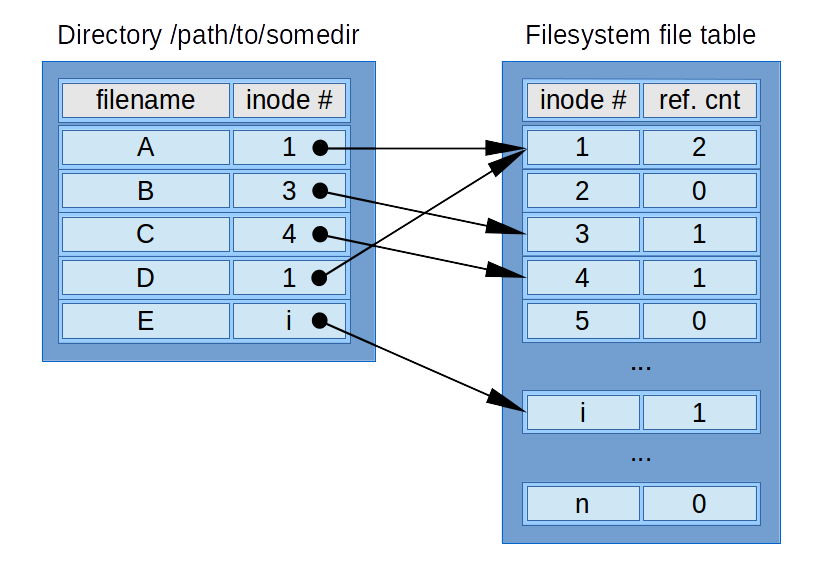
source: Wikipedia
This is the most efficient way to link:
the underlying file on the file system is not duplicated
it is super efficient and resource friendly
hard-linkstays valid when anotherhard-linkto the same reference is deleted/moved
There are some limitations to use hard-links:
not all file systems support
hard-linkshard-linksdon’t work across file systems/partitions
Soft-link#
soft-link, also called symlink (symbolic link), is much more similar to a shortcut or a redirection to another name.It is as efficient as a hard-link but has different properties:
works across a filesystem/partition boundaries
becomes invalid then the pointed name is deleted or moved (no shared ownership)
Copy#
It is not efficient nor resource friendly but preserve the file from deletion/modification of the reference.